Obstacle Dash Precision
Reviews
Obstacle Dash Precision strips the side-scrolling runner down to its timing core: you only steer vertically, and every ring or rotating hazard tests your ability to read the screen and adjust. The pre-round hazard selection is the standout feature, giving beginners a manageable entry point while letting veterans pile on faster, denser obstacles. It is a desktop browser game with no downloads, so it suits short sessions. The trade-off is a narrow control scheme that may feel repetitive to players seeking more varied movement.
Description
Auto-Scrolling and Vertical Steering
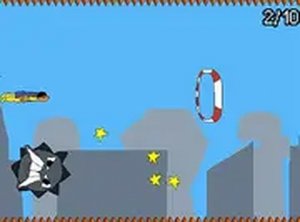
In Obstacle Dash Precision, the character advances from left to right without player input. Your only control is vertical movement, handled with keyboard keys or mouse clicks. Rings appear at varying heights and positions, and you must align your character with each one as it arrives. Between rings, rotating hazards occupy the space, demanding accurate timing to slip past. The game rewards reading the screen quickly and making small, deliberate adjustments rather than broad, panicked movements.
Pre-Round Hazard Selection
Before each round, you choose which hazard types will appear. This is not a difficulty slider in disguise; it changes the composition of the challenge. Beginners can limit the field to a few slow-moving obstacles, while experienced players can introduce faster and more densely placed hazards. The system supports gradual progression without forcing anyone into overwhelming difficulty, and it encourages experimenting with different hazard combinations to keep sessions fresh.
Visual Cues and Steady Pace
Rings are highlighted as you approach, and each hazard type has a distinct shape and movement pattern that becomes recognizable with practice. The side-scrolling format maintains a steady speed, so there is always a moment to plan the next move. That pacing makes the game accessible to newcomers while still offering enough speed to challenge players who want a reflex test.
Browser-Only Access
Obstacle Dash Precision runs entirely in a web browser on desktop computers. No downloads or installations are required. Controls are simple and responsive, needing only a few keys or mouse clicks. The content is appropriate for all ages, with no mature themes or complex rules, and it is free to play.
Compatibility
Faq
Can I play Obstacle Dash Precision on a phone or tablet?
Does Obstacle Dash Precision have a fixed difficulty level?
What is the main goal in Obstacle Dash Precision?
Are there different types of hazards in Obstacle Dash Precision?
Is Obstacle Dash Precision free to play?
What skills does Obstacle Dash Precision help improve?
Related Titles

Orbital Tap Journey Arcade

Hold Position 3 Defense Strategy
World Explore Idle Strategy
Frontier Space Precision Pilot

Word Snatch Puzzle Game

Candy Word Puzzle Game
Minesweeper Deduction Puzzle

Choo Choo Train Puzzle Adventure

Empire Builder: Idle Strategy
Guardian Idle Defense Strategy
Power Plant Idle Strategy Game

Editorial Notes