Onward Jigsaw Puzzle
Reviews
Onward Jigsaw Puzzle delivers exactly what its name suggests: drag-and-drop assembly of film artwork with selectable difficulty and a preview guide. The lack of a timer makes it approachable for children and adults who prefer low-stakes play. Its main limitation is scope—the experience rests on static scenes and standard jigsaw mechanics rather than added modes or progression systems. It works best as a relaxed family activity rather than a deep puzzle challenge.
Description
Piecing Together the Story
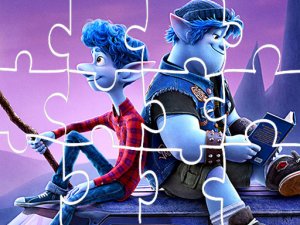
Onward Jigsaw Puzzle turns scenes from the animated film into assemble-at-your-own-pace puzzles. The goal is straightforward: complete each picture by placing every piece correctly. There is no timer or fail state, so the focus stays on matching shapes and colors rather than racing a clock. [IMG_1]
Choosing a Scene and Difficulty
Players begin by selecting a puzzle image from the available cartoon scenes. A difficulty setting determines how many pieces appear on the board, with easier options using fewer pieces and harder options increasing the count. This lets younger players start simple while adults can opt for a more involved assembly.
Controls and Feedback
Assembly uses drag-and-drop: pick up a piece and drop it onto the board. A preview feature shows the full image as a reference, which helps when large areas of similar color make placement ambiguous. The game tracks progress and time, so players can see how their speed changes across attempts. [IMG_2]
Who It Suits
The absence of time pressure and the intuitive interface make this a reasonable fit for family sessions, casual solo play, or anyone who enjoys movie-themed puzzles. Because the artwork comes directly from the film, familiarity with the story adds context to each scene, though no prior knowledge is required to complete a puzzle.
Compatibility
Faq
Does Onward Jigsaw Puzzle have a time limit or penalty for slow play?
Can I change the difficulty after starting a puzzle in Onward Jigsaw Puzzle?
What devices can run Onward Jigsaw Puzzle?
Is Onward Jigsaw Puzzle suitable for young children?
Does Onward Jigsaw Puzzle include scenes beyond those shown in the movie?
Is there a way to see the completed picture while assembling in Onward Jigsaw Puzzle?
Related Titles
Galactic Pixel Storm Space Shooter
Waffle Word Puzzle Challenge
Word Twist Puzzle Game
Daily Word Puzzle Challenge
Word Lawrie Vocabulary Puzzle

Bubble Word Puzzle
Word Swipe Logic Puzzle
Candy Word Puzzle Game
Daily Micro Crossword Puzzle
Word Sort Puzzle Game
Spelling Platform Adventure

Editorial Notes