Geometry Clicker Idle Game
Reviews
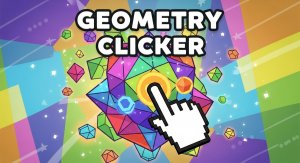
Geometry Clicker offers a straightforward idle experience with a satisfying upgrade system. The 3D shape is visually pleasing, and the progression feels steady. It is easy to pick up for a few minutes or leave running to collect auto-points. The lack of pressure makes it a good choice for casual players who enjoy watching numbers grow.
Description
Game Introduction
Geometry Clicker is a relaxing idle clicker game where you tap a spinning 3D shape to earn Geometry Points. The core objective is to accumulate points and purchase upgrades to increase your earnings over time. There is no final goal or win condition, allowing you to play at your own pace indefinitely. Its simple mechanics and clean visuals make it a stress-free way to pass time.
How to Play
Players typically click or tap the central 3D shape to earn Geometry Points, which are displayed on a score counter. These points can be spent on upgrades from a panel on the right side of the screen. Upgrades may increase points per click, add automatic point generation, or apply multipliers to boost all earnings. The game continues without a set endpoint, so you can keep improving your score as long as you like.
Game Features
Features include straightforward tap mechanics that are easy to learn. The game offers satisfying progression as your score grows with each upgrade. Relaxing 3D visuals create a calm atmosphere. Upgrades provide strategic choices to maximize point generation. Auto-points allow the game to progress even when you are not actively tapping.
Tips for Success
Focus on purchasing upgrades that increase your points per click early on, as this directly boosts your earnings. Once you have a steady income, invest in auto-point generation to earn points even when you are not playing. Regularly check the upgrade panel for new options and prioritize multipliers to accelerate your score growth. Consistent play, even in short sessions, will lead to steady progress.
Compatibility
Faq
Is Geometry Clicker free to play?
Does the game work on mobile devices?
Can I play offline?
How do I reset my progress?
Are there any achievements or goals?
What happens if I close the browser?
Handpicked Games

Area 51 Raid Strategy Game
Space Drone Idle Mining Game
Snake Idle Growth Puzzle

Insect Colony Sim Strategy
Idle Magic Wall Idle Game

Synergism Idle Incremental Strategy

Incremental Epic Hero Idle RPG

Infinite Cosmos Strategy Game

Heart of Galaxy: Idle Space Strategy