Word Find Puzzle Game
Reviews
Word Find Puzzle Game sticks to the classic formula: a letter grid, a word list, and eight possible directions. Its strengths are accessibility and low pressure. There is no timer, no registration, and no download, so it fits quick breaks and longer sessions alike. The main limitation is that it offers no narrative or progression beyond clearing puzzles. Players who want a focused vocabulary and concentration exercise will get the most from it.
Description
Spotting Words in a Letter Grid
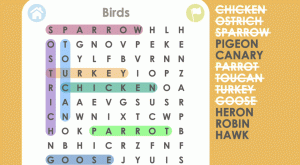
Each round hands you a grid of letters and a list of words to locate. The words are not arranged in a single predictable pattern: they can run left to right, right to left, top to bottom, bottom to top, or diagonally. Some appear backward. Your task is to trace each listed word from its first letter to its last, then move on to the next one until the list is cleared.
Drag-to-Select Controls
Selection is handled by clicking and dragging across the letters that form a word. When the chosen sequence matches an entry on the list, the word is highlighted in the grid and crossed off. Wrong selections simply do not register, so there is no penalty for guessing. The interface is built for quick, low-friction interaction on both computers and touchscreens, which matters because the same drag motion works with a mouse or a finger.
Pacing and Difficulty
Nothing forces you to hurry. You can scan the grid for as long as you like, jump between words, or restart your search from a different corner. Puzzles present a fresh set of words each time, and placements vary from one grid to the next, which keeps the pattern-recognition challenge from becoming rote. The game is designed to be calm rather than demanding, so sessions can be as short as a coffee break or as long as you want to keep going.
Access and Audience
No download, account, or sign-up stands between you and the first puzzle. The game runs in any modern web browser, so the same experience is available on a laptop, tablet, or phone. Because the rules are limited to finding and selecting words, it suits a wide age range, including families looking for a shared activity. The mental workout comes from vocabulary recall and sustained concentration rather than reflexes or timing.
Compatibility
Faq
Do I need to create an account to play Word Find Puzzle Game?
Can words in Word Find Puzzle Game appear backward or diagonally?
Is Word Find Puzzle Game suitable for children?
Does Word Find Puzzle Game work on phones and tablets?
Are the puzzles in Word Find Puzzle Game always the same?
What is the best way to get faster at word searches?
Related Titles

Amazon Enigma Temple Adventure

Waffle Word Puzzle Challenge

Word Link Puzzle Game

Words of Wonders Word Puzzle

Drawaria.online

Word Salad Puzzle: Word Game
Word Snatch Puzzle Game
Word Search Puzzle Online

Family Feud Online Quiz Game
Daily Word Puzzle Challenge

Quiz Champion Trivia Game

Editorial Notes