Mystery Chapter 1: Facility Escape
Reviews
Mystery Chapter 1: Facility Escape delivers a no-pressure puzzle experience built around clicking, collecting, and connecting clues. Its strength lies in the relaxed pacing and family-safe design, which makes it accessible to a wide audience. The lack of a timer or fail state encourages thorough exploration. Players who prefer fast action may find it slow, but those who enjoy methodical mystery solving will appreciate the focus on observation and logic.
Description
Core Loop and Player Objective
You begin inside a calm facility with no memory of your arrival. The immediate goal is to survey each room, click on objects to examine them, and collect useful items into an inventory. Progress depends on connecting information found in different areas. There is no time limit, so you can linger on a detail or step away without penalty. The game mixes storytelling with gentle brain challenges, making it approachable for players of all skill levels.
Interaction and Puzzle Design
Everything runs through mouse clicks. Clicking a drawer might reveal a key; clicking a panel might show a sequence. Some puzzles require combining inventory items to create a new tool that unlocks a space or solves a mechanism. The challenge comes from observation and logic, not reflexes. If you get stuck, reviewing gathered clues often reveals the answer, because solutions tend to link information from separate rooms.
Pacing and Accessibility
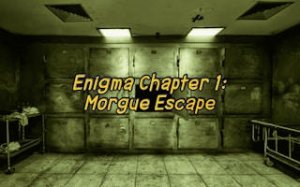
The absence of a timer or fail state keeps the experience relaxing yet mentally stimulating. Family-safe content and intuitive controls mean casual puzzle players and escape room fans can both settle in. The game is free to play in a browser with no downloads or installations. [IMG_1]
Practical Tips for New Players
Explore every area thoroughly; important clues may sit in unexpected places. Keep a mental note of patterns or sequences, as they often lead to puzzle solutions. Click on objects more than once, since some may reveal new details after certain actions. When stuck, step back and review your items and clues—sometimes the answer is in combining them.
✅ Compatibility & Testing
Faq
Is Mystery Chapter 1: Facility Escape free to play?
Do I need to be good at puzzle games to enjoy this?
Can I get stuck in Mystery Chapter 1: Facility Escape?
What type of game is Mystery Chapter 1: Facility Escape?
Is this game suitable for children or family play?
How do I combine items in Mystery Chapter 1: Facility Escape?
Related Titles

Amazon Enigma Temple Adventure
Frog Journey Platformer

Word Salad Puzzle: Word Game
Word Snatch Puzzle Game
Word Search Puzzle Online
Daily Word Puzzle Challenge

Word Scramble Puzzle Game
Crocword Word Puzzle
Word Builder Puzzle

WODR Word Puzzle Game Online

Word Swipe Logic Puzzle

Editorial Notes