Moment Capture Challenge
Reviews
Moment Capture Challenge does one thing and does it without clutter. The moving indicator, static path, and target dot leave no room for distraction, so success depends on steady attention rather than reflexes alone. Difficulty grows through higher required tap counts and subtle pace shifts, which suits players who like incremental precision tests. The browser-based format and minimal visuals make it easy to pick up for short sessions, though anyone seeking varied mechanics or narrative depth will find the scope deliberately narrow.
Description
The Core Timing Loop
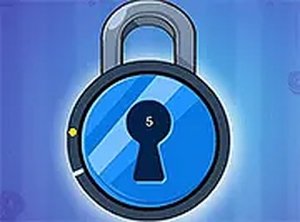
Every stage of Moment Capture Challenge is built on one action: a moving indicator travels along a fixed path, and you press or click at the exact moment it overlaps a designated spot. A visual cue confirms a correct input. That single loop repeats, so the challenge comes from your consistency rather than from learning new controls.
How Difficulty Scales
Levels begin with a small number of correct taps, giving you room to settle into the rhythm. As you progress, the required count rises, which means holding focus for longer stretches. The indicator's pace can also change subtly between stages. The rule never changes, but the pressure to stay accurate does, so mistakes tend to come from drifting attention rather than from unfamiliar mechanics.
Minimal Visuals, Immediate Feedback
The screen stays deliberately sparse: a path, a moving marker, and a target dot. When you hit the overlap, a short animation tells you it worked. Because there are no complex graphics competing for attention, your own timing is the only thing on screen. That design keeps the experience calm and makes each miss easy to understand.
Playing Across Devices
Moment Capture Challenge runs entirely in a web browser on desktop computers, tablets, and smartphones. Nothing needs to be downloaded or installed. The interface adapts to different screen sizes, and full-screen mode can improve visibility. That means a session can fit into a work break, a commute, or a few minutes at home.
✅ Compatibility & Testing
Faq
What is the goal in Moment Capture Challenge?
Does Moment Capture Challenge require any downloads?
Is Moment Capture Challenge suitable for beginners?
What makes later levels harder?
Can I play Moment Capture Challenge on a phone?
How can I improve my accuracy in Moment Capture Challenge?
Related Titles

Amazon Enigma Temple Adventure

Word Salad Puzzle: Word Game
Word Snatch Puzzle Game
Word Search Puzzle Online
Daily Word Puzzle Challenge

Word Scramble Puzzle Game
Crocword Word Puzzle
Word Builder Puzzle
WODR Word Puzzle Game Online
Word Swipe Logic Puzzle

Words of Wonders Word Search
Editorial Notes