Picture Rearrangement Logic Puzzle
Reviews
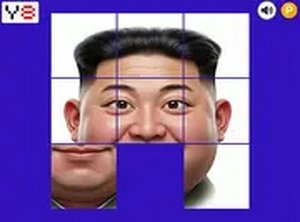
Picture Rearrangement Logic Puzzle delivers exactly what its name suggests: a scrambled image, a set of sliding tiles, and a visible target to work toward. The three grid sizes give it a sensible difficulty curve, and browser-based controls keep it accessible. Its strength is the immediate visual feedback that makes progress easy to read. The main limitation is that the description does not mention timers, scoring, or additional modes, so players seeking competitive features may find it basic.
Description
How the Sliding Mechanism Works
The board holds a scrambled image divided into square tiles. One space remains empty, and you shift adjacent pieces into it to rearrange the board. Every slide changes the position of multiple tiles, so a move that looks helpful can disrupt a section you already assembled. The goal is to reach the complete, unbroken picture. Because the final image is visible as a reference, you always know what the solved state should look like, even when the current arrangement seems far from it.
Grid Sizes and Difficulty
Three grid options are available: 3x3, 4x4, and 5x5. A 3x3 board contains nine positions and typically requires only a handful of moves, making it a practical starting point for anyone new to sliding puzzles. Moving to 4x4 increases the number of tiles and the possible arrangements, which means longer solution paths and more chances to undo your own progress. The 5x5 grid multiplies that complexity again, demanding sustained planning rather than quick trial and error. This progression lets players choose a challenge level that matches their current comfort with spatial reasoning.
Visual Feedback and Reference
Each tile is a distinct section of a larger picture, so partial progress is visible as the image gradually reassembles. The completed picture serves as a constant reference, helping you decide where each piece belongs. This design suits players who prefer working from visual cues rather than abstract logic alone. You do not need to memorize the target arrangement or decode symbols; the image itself tells you whether a tile is in the right region.
Controls and Accessibility
The game runs in a web browser without downloads or installation. On desktop, mouse clicks move tiles; on mobile, touch gestures do the same. This makes it convenient for short sessions during a break or while relaxing at home. The interface is simple enough that players of any age can begin solving immediately, and no account or setup is required.
Cognitive Skills in Play
Tracking multiple tiles and their positions exercises short-term memory. Planning a sequence of slides before executing them builds strategic thinking. Recognizing where a tile belongs within the larger image strengthens visual-spatial reasoning. These demands make the puzzle a focused way to spend free time, though the game does not claim clinical benefits.
Compatibility
Faq
What is the goal of Picture Rearrangement Logic Puzzle?
What grid sizes does the game offer?
Do I need to download anything to play?
How do the controls work on desktop and mobile?
Does the game help with memory or problem-solving skills?
Is there a time limit or move counter?
Related Titles

Amazon Enigma Temple Adventure

Hold Position 3 Defense Strategy
World Explore Idle Strategy
Frontier Space Precision Pilot

Word Link Puzzle Game

Words of Wonders Word Puzzle

Word Salad Puzzle: Word Game
Lex Word Puzzle Challenge
Word Snatch Puzzle Game

Word Search Puzzle Online
Daily Word Puzzle Challenge

Editorial Notes