Custom Doll Designer Fashion Game
Reviews
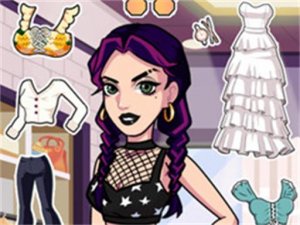
Custom Doll Designer Fashion Game keeps its scope narrow: choose a pose, hair, expression, eyes, outfit, and accessories, then save the result as a wallpaper. That simplicity is the point. Young players get a complete creative loop without complex menus or failure states. The main limitation is depth; children who want layered customization or animated results may outgrow it quickly. For its intended audience, the game delivers a calm, family-friendly activity that turns design choices into a usable image.
Description
Building a Doll Step by Step
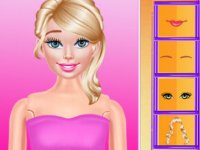
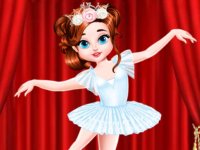
Custom Doll Designer Fashion Game gives children a straightforward sequence for creating a character. The process starts with a pose, which sets the overall silhouette of the doll. From there, players choose a hairstyle that matches their idea. Next comes an expression and a colored eye selection, two choices that work together to give the doll a recognizable mood. Only after those decisions are made does the dressing stage open up, where clothing and accessories complete the look. The order matters because each choice narrows what the final doll will feel like.
Simple Controls for Young Designers
Every step uses on-screen controls, so no typing, dragging, or complex menus are required. A child taps through pose options, then hair, then facial details, then outfits. The interface is built around single selections rather than layered customization, which keeps the activity accessible for young players who may not read fluently yet. That same simplicity also means the game avoids frustration: there is no wrong choice, only a different result.
Saving and Using the Finished Doll
Once the design is complete, the doll can be saved as a wallpaper image directly to the device. This turns the creation into something a child can actually use rather than just view inside the app. The saved image becomes a personal artifact, which gives the design session a clear endpoint and a reason to try again with a new combination.
Who This Game Suits
The content is family-friendly and aimed at children who enjoy fashion, drawing, or making choices about how a character looks. Sessions are calm and self-paced, with no timers or competitive pressure. Parents looking for a quiet creative activity will find that the game supports decision-making and visual experimentation without requiring adult supervision at every step.
Compatibility
Faq
What age group is Custom Doll Designer Fashion Game designed for?
Can I save more than one doll design in Custom Doll Designer Fashion Game?
Does Custom Doll Designer Fashion Game require an internet connection?
Are there in-app purchases or ads in Custom Doll Designer Fashion Game?
Can boys play Custom Doll Designer Fashion Game, or is it only for girls?
What happens if a child does not like the doll they made in Custom Doll Designer Fashion Game?
Related Titles
Summer Style Friends Fashion Game

Princess Fashion Makeover Game

Jungle Soccer: Animal Athletes Arcade
Jungle Animal Summer Style Studio
Dove Fashion Dress Up

Panda Kids Cleanup Adventure
Unicorn Idol Pet Care
Animal Ice Cream Shop for Children

Bubble Tea Maker Cooking Game
Emoji Makeup Dress Up Challenge
Cute Doll Designer Fashion Game
Editorial Notes