Cute Doll Designer Fashion Game
Reviews
Cute Doll Designer Fashion Game keeps its scope narrow: pick a base, style the face and hair, add accessories, then save the result as a wallpaper. That simplicity suits its target audience of children and anyone wanting a low-stress creative break. The lack of scoring or time limits means the only motivation is visual satisfaction, which works for dress-up fans but may feel thin for players expecting progression or challenges. The wallpaper export is the standout feature, giving each session a tangible outcome.
Description
Building a Doll from Scratch
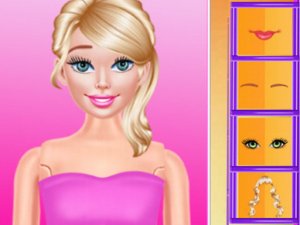
Every session starts with a plain base doll. From there, the player selects a hairstyle and color, then sets the eye shape, eyebrow style, and blush tone. These choices define the doll's face before any clothing or accessories enter the picture. Because the base is neutral, the same starting point can produce wildly different results depending on the order and combination of selections.
Accessorizing and Mixing Options
Once the face and hair are set, the game opens up accessories: bows, glasses, jewelry, hats, and shoes. Players can mix and match freely, swapping items until the overall look feels right. There is no scoring system or time pressure, so the focus stays on visual experimentation. [IMG_1] The accessory layer is where most of the personal style emerges, since small changes like a different hat or pair of glasses can shift the doll's entire vibe.
Saving and Using Your Creation
When the design is complete, the game saves the doll as a wallpaper directly on the device. That feature turns a temporary dress-up session into something the player keeps and sees daily. [IMG_2] It also gives the activity a clear endpoint, which helps younger players understand when a design is finished.
Controls and Audience
Controls are limited to simple clicks and drags, so no reading-heavy menus or complex rules block the experience. The kawaii-style graphics use bright, colorful visuals that appeal to children and anyone who enjoys cute aesthetics. The game is designed for all ages and contains no inappropriate content, making it a straightforward choice for family use.
Compatibility
Faq
Can I save more than one doll design in Cute Doll Designer Fashion Game?
Does Cute Doll Designer Fashion Game require an internet connection?
What age group is Cute Doll Designer Fashion Game designed for?
Are there any time limits or scoring rules in Cute Doll Designer Fashion Game?
Can I change the doll's skin tone or body shape?
Is Cute Doll Designer Fashion Game free to play?
Related Titles
Summer Style Friends Fashion Game
Orbital Tap Journey Arcade

Princess Fashion Makeover Game

Jungle Soccer: Animal Athletes Arcade

Grid Collector Clicker
Frog Journey Platformer
Galactic Pixel Storm Space Shooter
Word Link Puzzle Game

Words of Wonders Word Puzzle
Word Search Puzzle Online

Bubble Word Puzzle

Editorial Notes